
Joule Work Wants to Be the Front Door to SAP. Who Owns the Door?
Joule Work lets people talk to SAP in plain words. What is proven, what is only a claim, and the governance questions architects should ask first.
It is Monday, 8:42 a.m. A finance controller types one sentence: "Why did days sales outstanding jump in Germany, and which customers should collections call first?"
No transaction code. No tile. No report variant saved in 2019 by someone who has since left.
A few seconds later an assistant has pulled data from several systems, ranked the customers and drafted the call list.
That is the picture SAP painted on 6 October at SAP Connect in Las Vegas. And it is no longer only a demo. SAP says Joule Work is live for 110,000 of its own employees, and the customer rollout has begun.
So let's take it seriously. What is it, what is proven, and what changes for the people who run SAP landscapes?
The short version: Joule Work is a new way in. The interface is easy to love. The hard part is everything behind it: identity, data, logs and third-party connections.
What Joule Work actually is
SAP calls it an AI user interface. You say what you want in your own words. That triggers Joule Assistants, which SAP describes as "smart teammates organized by function". The assistants coordinate teams of Joule Agents that pull insights and automate routine work across business domains and systems.
SAP also says the workspaces are "intent-driven" and "built in real time". In plain words: the screen you get is assembled around your goal, not picked from a menu.
There are three ways in, according to SAP's Sapphire guide:
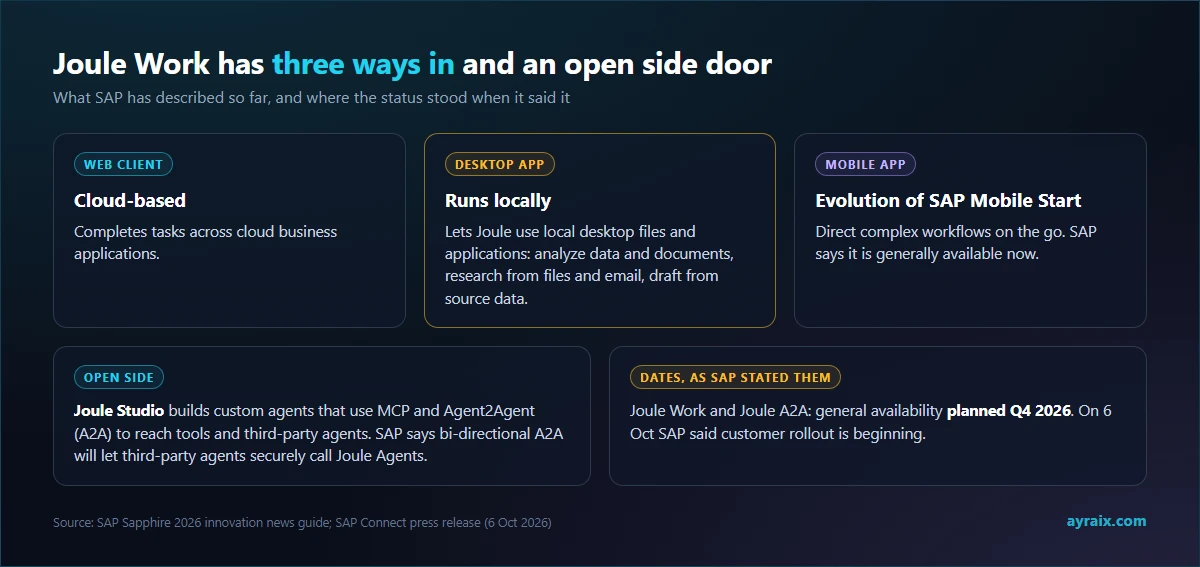
- A cloud-based web client for tasks across cloud business applications.
- A desktop app that runs locally. It lets Joule use local files and applications, for example to analyze data and documents, research topics from files and email, and draft documents from source data.
- A mobile app, an evolution of SAP Mobile Start. SAP says it is generally available now.
Behind it sits the SAP Knowledge Graph, which SAP says maps more than 7 million data fields. And it has an open side: Joule Studio lets people build custom agents that use MCP and Agent2Agent (A2A) to reach tools and third-party agents, with a choice of more than 70 AI models. SAP also says bi-directional A2A will let third-party agents securely call Joule Agents.
What is proven, and what is a claim
Let's separate the two, because an announcement mixes them.
Stated as fact by SAP: Joule Work is live for 110,000 SAP employees. A select group of customers is using it. Rollout to customers has begun. General availability for Joule Work and Joule A2A was planned for Q4 2026 in SAP's own guide.
Only a claim so far: SAP says it sees 20% productivity gains across finance, HR and procurement. That number comes from SAP's own staff on SAP's own tool. Nobody outside has measured it.
A customer story, not a benchmark: Maschinenfabrik Reinhausen told SAP that work which took up to an hour in S/4HANA is now available in seconds. Another early customer, CONA Services, described getting "Joule ready" with help on architecture activation and fixing defects. Read that second one twice. It says this is not a switch you flip. There is preparation work.
One more detail I enjoyed. SAP's press release notes it was created with the assistance of artificial intelligence and reviewed by the editorial team. Fitting.
Three shifts hiding inside the announcement
1. The interface becomes the policy surface
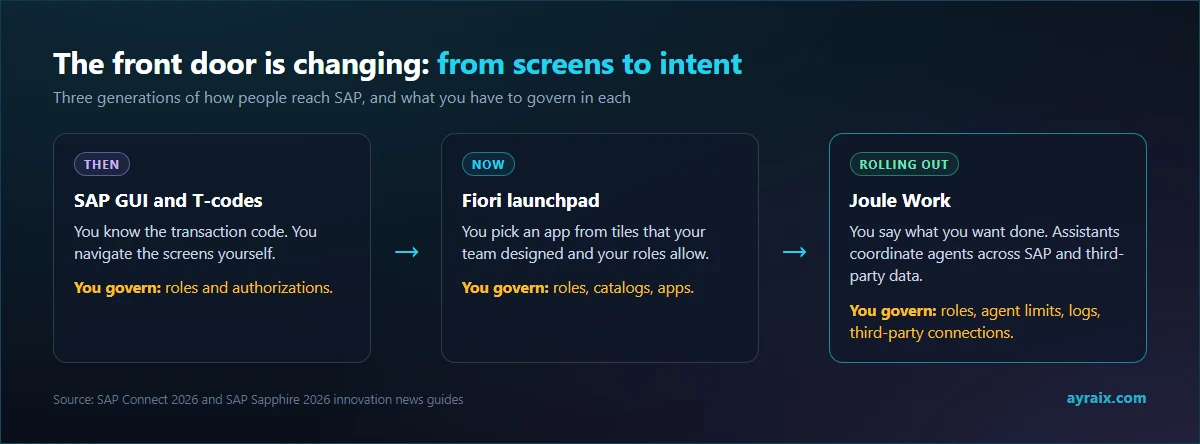
With Fiori, your team decides which tiles exist and which roles see them. The menu is the guardrail.
With Joule Work, the user's own words decide the path. There is no menu to restrict. Permissions, agent limits and logs now carry all the weight. That is not a bad thing. But it moves the work from UI design to access design.
2. The desktop app is a different animal
A web client talks to your cloud applications. A desktop app that "runs locally" and can use local files and applications is something else. SAP data, email, spreadsheets and documents can end up in the same agent's hands on the same laptop.
That raises plain, practical questions. What can the app reach? What leaves the device? Which of the 70+ models sees which data? SAP's published pages describe the capability. They do not describe the data flow. Ask for it.
3. The side door opens both ways
Going out, Joule agents can use MCP tools and call third-party agents. Coming in, SAP says third-party agents will be able to call Joule Agents. Every one of those links is a new trust relationship. Treat each like onboarding an API partner: an owner, a scope, a review date.
What this means for your Fiori team
Let's be fair. SAP did not say Fiori goes away. The web client is described as helping users complete tasks that need interaction with cloud applications, so it works alongside apps. Coexistence for years is the sensible expectation.
But habits form at the front door. If people start with a question instead of a tile, the apps behind it become capabilities that an agent calls, and a screen is only one way to reach them.
My read: the safest investment is not another launchpad redesign. It is clean roles, released APIs and tidy data. Agents call interfaces, not screens. Anything you expose cleanly, an agent can use safely. Anything buried in a screen-only custom transaction is hard for both agents and governance to see.
A checklist for architects
- Identity. Confirm that each Joule action runs as the real, individual user, not a shared technical user. Ask SAP to show it in a trace.
- Role hygiene first. Joule works within each user's authorizations. Wide roles mean wide answers. (More on this in our post on agents and access.)
- Autonomy defaults. SAP says you control the level. Set it per process, and start low.
- A data map for the desktop app. What it can reach, what is logged, what leaves the machine.
- A model policy. With 70+ models available in Joule Studio, decide who may choose which model for which class of data.
- An agent register. SAP points to SAP AI Agent Hub in SAP LeanIX as a central inventory. Use one, whichever tool you choose.
- A third-party allowlist for MCP and A2A connections, with an owner for each.
- A cost view. SAP talks about helping customers manage "AI value and consumption". That means metering. See our AI Units post.
- An exit plan. What happens to skills and agents built in Joule Studio if you ever move?
A glossary, because SAP's vocabulary is multiplying
- Joule: SAP's AI assistant brand.
- Joule Work: the new AI interface, on web, desktop and mobile.
- Joule Assistants: function-based "teammates" for areas like finance, HR and supply chain. They coordinate agents.
- Joule Agents: the specialised workers that carry out the steps.
- Joule Studio: where customers build their own skills and agents, from no-code to pro-code, with a choice of 70+ models.
- SAP Knowledge Graph: the business-context layer SAP says maps more than 7 million data fields.
- SAP Business AI Platform: SAP's place to build, contextualise and govern AI across SAP and third-party environments.
- SAP AI Agent Hub (in SAP LeanIX): a central inventory of enterprise agents.
- SAP Autonomous Suite: SAP's line-of-business domains (finance, spend, supply chain, human capital management, customer experience) with assistants and agents added.
Where I would pilot first
Look at the customer examples SAP chose to show. A collections assistant that prioritises work and recommends the next action. A billing assistant that helps identify potential issues earlier. A sourcing assistant in a pilot. Mostly find, check and recommend work.
Copy that order. A good first pilot has five traits:
- Read-heavy. Analysis and preparation before anything that changes data.
- Clean data. If people already distrust the report, the assistant will inherit the distrust.
- A named owner who cares about the result.
- A baseline. Time per task, error rate and rework today, so you can prove a gain or admit there is none.
- A small financial blast radius. If it goes wrong, nobody loses money.
Then measure honestly: baseline time, error rate, rework, adoption and cost per task. SAP's 20% is a number about SAP. Yours is the only one that matters to you.
The take
This is not a Fiori funeral. It is a new layer on top, and a good one if you do the homework.
But a conversational front door moves power. It moves it from whoever designs menus to whoever sets permissions, limits and logs. In most companies, that person does not exist yet.
Find them before the rollout does.
Sources
- SAP News Center: SAP Puts the Autonomous Enterprise to Work (6 Oct 2026)
- SAP Connect 2026 Innovation News Guide
- SAP Sapphire 2026 Innovation News Guide (Joule Work access and interoperability)